- Learn Prompting's Newsletter
- Posts
- Meet Claude Cowork: Your AI Intern for Everyday Tasks
Meet Claude Cowork: Your AI Intern for Everyday Tasks
Learn how this no-code tool lets Claude edit files, build apps, organize data, and more.
Learn Prompting Newsletter
Your Weekly Guide to Generative AI Development
Meet Claude Cowork: Your AI Intern for Everyday Tasks
Learn how this no-code tool lets Claude edit files, build apps, organize data, and more.
Hey there,
Anthropic just released a version of Claude Code for the non technical crowd and it's incredible. Claude Cowork is a new product that can access and edit your files, browse the internet, and do all kinds of tasks for you. This new tool is built upon the successful Claude Code tool but doesn’t require any coding or a confusing terminal experience.
What is Claude Cowork?
Claude Cowork isn’t just a “smarter” chatbot, it's a new AI mode that gives Claude the ability to work directly with the files saved on your computer. Whether you’re looking to organize your files, build an app, create presentations, analyze data, research topics on the internet, or create new AI-powered workflows, Cowork is the tool for you. Some of you might be thinking that this sounds a lot like traditional Claude Code, and you’re right! Think of it as the power of Claude Code, but wrapped in a user-friendly interface that doesn't require a single line of code or terminal command.

This is the Cowork homepage. You can manage a task here and see its progress, created files, and what it has access to.
How It Works
Now that we have a better understanding of what Cowork is, let’s look into how it works. The basic idea is similar to the traditional chatbot experience with a few important changes.
You’ll start by explaining your task to Claude using natural language. You’ll need to include any files / folders you want Claude to access in this initial prompt.
Claude will analyze your request and create a plan of action. This will detail the steps it will take and what exactly will be created.
You’ll either approve this plan as is or make further changes.
Once approved, Claude will get to work completing the plan. You can see what task Claude is currently working on as well as all completed tasks.
Inspect the output. The new or modified files will be added directly to your computer.
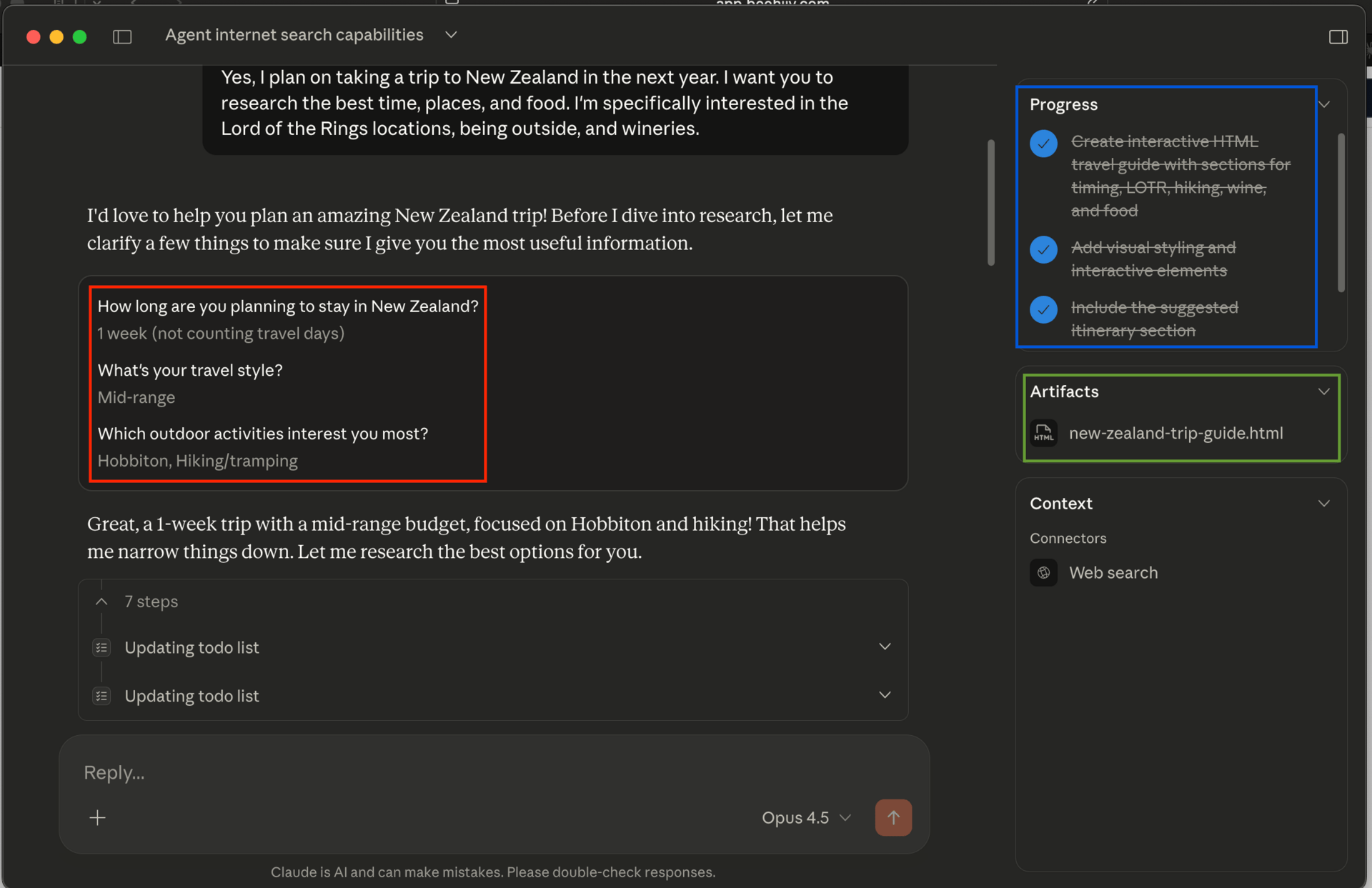
You can see the above steps at work in this example.
Red: Follow-up questions that Claude asked me. Blue: Current task progress. Green: Any new or changed files resulting from the tasks.
Claude Cowork In Action
Cowork is one of those tools that can be as sophisticated or simple as you need it to be. Some examples will push the tool to its very limits while others will be quick, helpful tasks.
Organizing my Desktop
In this example I asked Claude to organize my desktop. To be clear, I didn’t give Claude access to my entire desktop but instead created a new folder and moved my ~260 unorganized screenshots into it. My prompt was simple, view and organize my screenshots into new subfolders. Claude then looked at each image, judged what it was showing and moved it accordingly.
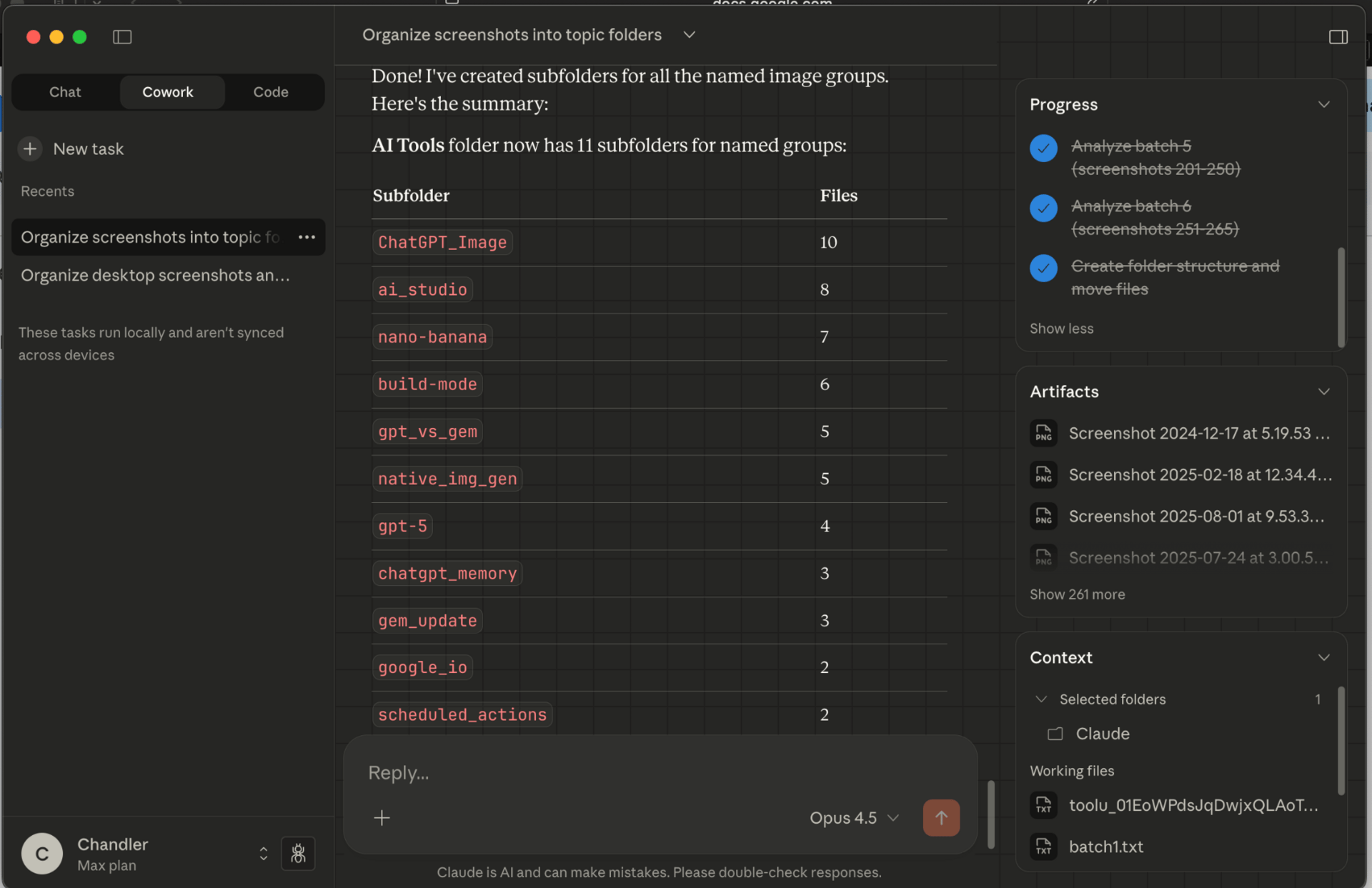
Claude Cowork was able to accurately group my images into subfolders but I had to explicitly tell it to work in batches to avoid errors.
A Word of Caution
While Claude Cowork is an impressive new tool, it's important to be cautious and to understand the potential dangers. The two main dangers of Cowork are misinterpreted instructions and malicious prompts.
Anyone who uses AI tools on a regular basis knows that they can easily misunderstand your instructions. While this is a minor issue for chatbots, it can be terrible for AI agents. Cowork tries its best to alleviate this issue by first developing a thorough plan that the user must approve. Nevertheless, you should always take extra care to provide a detailed explanation and never unleash Claude in a folder with sensitive information.
“By default, the main thing to know is that Claude can take potentially destructive actions (such as deleting local files) if it’s instructed to. Since there’s always some chance that Claude might misinterpret your instructions, you should give Claude very clear guidance around things like this.”
Malicious prompts are a more unique problem. Most users might never encounter them, but they are a danger nonetheless. Anthropic recommends that you only give Cowork access to “trusted” websites in an effort to minimize hack injection attacks.
“You should also be aware of the risk of “prompt injections”: attempts by attackers to alter Claude’s plans through content it might encounter on the internet.”
How to Access
Access to Claude Cowork is very restricted at the moment. It is currently available as a research preview only for Claude Max subscribers using the macOS desktop app. If you aren’t a Max user, you can join the waitlist to be included in the eventual future rollout.
We’re hosting a free 1-hour Lightning Lesson on AI red-teaming — a fast, practical walkthrough of how to stress-test AI systems before you ship them.
Join the Free Lesson →We’re also opening enrollment for our AI Red-Teaming Masterclass — designed for cybersecurity, DevOps, and app-sec professionals, plus technical leaders like CTOs and CISOs. The course is $1,199 per student, with discounts available for bulk seats.
View Masterclass →My Thoughts:
We’re only a few weeks into 2026, and we’ve already seen some incredibly powerful new products. Claude Cowork actually feels like it’s living up to the promise of “an AI assistant who can do your job for you”. To be clear, I don’t think it can replace anyone yet, it's more of an AI intern who can help complete some of the lower hanging fruit. That being said, the fact that it can take independent action means that you don’t need to constantly be involved by copying and pasting responses or uploading screenshots. But most importantly, you don't need to write or even know anything about coding to use this tool. The UI has that familiar chatbot design with some helpful new sections for managing an agent.
However, this increased power and usefulness comes at a cost. Similarly to other agentic tools like ChatGPT Atlas or Claude Code, we need to acknowledge that this powerful tool has flaws. Its ability to take actions on your behalf is its greatest strength but also its greatest weakness. As I mentioned before, the two major risks are misunderstanding your instructions by removing or altering the wrong files, and intentionally malicious prompt attacks. My recommendation is the same as Anthropic, create a unique folder for all Claude related work and only give Claude access to that file. This way you are limiting what it can access but you can also add (and remove) additional files when needed.
Of course the best way to judge Cowork’s usefulness is to try it for yourselves. Even if you don’t have the Claude Max plan, you can join the waitlist today!
Reply